
Guide for Game Masters
Point Crawl + Hex Crawl
The hex map holds the world. The point crawl drives the session. Here's how to combine both systems on a single map — with practical advice, external references, and a workflow you can use tonight.
For DMs running exploration-heavy campaigns in D&D 5e, OSR, Pathfinder, or any system where travel matters.
A hex map with terrain detail, overlaid with a point crawl travel network.

Key Takeaways
- Hexcrawl = detail. Every hex has terrain. The party moves hex by hex. Best for exploration and discovery.
- Point crawl = structure. Named locations connected by routes. The party jumps between meaningful points. Best for travel and pacing.
- Together: Use the hex map for world-building and close exploration. Use the point crawl for long-distance travel and session structure.
- In Hexer: Both systems share the same map. Toggle between hex detail and point crawl abstraction without switching tools.
- Auto-generate: One click converts your existing hex map into a point crawl network — settlements become nodes, roads become routes.
1. What Are Hexcrawls and Point Crawls?
Both are systems for running overland exploration in tabletop RPGs — but they model the world differently.
The Hexcrawl
Popularized by the original D&D outdoor rules and refined by the OSR community, a hexcrawl lays a grid over the wilderness. Each hex has a terrain type and can be keyed with encounters, landmarks, and secrets. The party navigates hex by hex, making directional choices each day. The hex grid is the map — every hex matters.
The Alexandrian's hexcrawl series is the definitive modern reference. It established the procedures most GMs now use: watch-based travel, encounter checks per hex, terrain modifiers, and the "hex key" format for content.
The Point Crawl
Coined by Chris Kutalik (Hill Cantons) and expanded by The Alexandrian, a point crawl abstracts the map to a graph of named locations (nodes) connected by routes (edges). Instead of tracking movement hex by hex, players choose which route to take between settlements, dungeons, and crossroads. Travel time and encounters happen along the route, not per hex.
Think of it as a subway map for your wilderness. The spatial detail between stations doesn't matter — what matters is which stations exist, how they connect, and how long the journey takes.
Both systems serve exploration, but at different resolutions. The question isn't "which is better" — it's "when should I zoom in, and when should I zoom out?"
When to Use Each

Left: hex crawl — every hex along the path. Right: point crawl — direct route between nodes.
| Situation | Use Hexcrawl | Use Point Crawl |
|---|---|---|
| Exploring unknown wilderness | Yes — hex by hex, discovering what's in each one | No — point crawls assume the party knows where they're going |
| Traveling to a known destination | Tedious — counting hexes, checking each one | Yes — pick a route, roll travel time and encounters |
| World-building and prep | Yes — paint terrain, key hexes, define the world | Yes — define the travel network and encounter tables |
| Running a session (pacing) | Slow — works when exploration IS the game | Fast — resolve travel in minutes, get to the action |
| Resource management | Detailed — track rations, water, torches per hex | Abstract — "you need 3 watches of supplies" |
The sweet spot: use the hex map for world-building and close-range exploration, and the point crawl for long-range travel between known locations. Most sessions will blend both — point crawl to cover the road, hex crawl when the party decides to "go off the path into the forest."
2. Why Combine Them?
Every DM who runs a hexcrawl hits the same problem: players travel 3 days along a road they've already explored, and you spend 20 minutes resolving hex-by-hex movement with nothing happening. The hex grid is beautiful for discovery but painful for routine travel.
Conversely, a pure point crawl loses the spatial richness. Players look at a node graph and ask "what's between Ironhold and the Sunken Tombs?" In a point crawl, the answer is "nothing you can interact with." In a hex crawl, the answer is "three hexes of mountain forest — you could find a shortcut, stumble into a cave, or get ambushed."
The combined approach solves both problems. The hex map is the source of truth about the world. The point crawl is a fast-travel overlay for when the party knows where they're going. When they go off-route — which is where the best stories happen — you zoom into hex-by-hex exploration.
This is exactly what The Alexandrian describes in his 5e hexcrawl series: a "keyed network" of major paths overlaid on a hex map, with the full grid available when players leave the network.
3. Build Your Hex Map First
The hex map is the foundation. Before you think about point crawls, you need terrain, points of interest, and geography. This doesn't need to take long — procedural generation gets you 80% of the way in seconds.
- Choose your scale. 6 miles per hex is the D&D standard — a party on foot covers 3-4 hexes per day. For a regional hexcrawl, start with a 40×30 grid. See our hex scale reference for detailed comparisons.
- Lay down terrain. Paint or generate your geography — mountains, forests, rivers, coastline. This is the physical world your point crawl routes will traverse. Terrain types affect travel time when you auto-generate the point crawl later.
- Place points of interest. Drop settlements, dungeons, temples, and ruins on the map. These become the natural candidates for point crawl nodes. Use DM notes to key hexes with encounters, secrets, and landmarks.
- Draw paths and regions. Roads and trails define the major routes between settlements. Regions give players a sense of territory. Both feed into point crawl generation.
Don't over-prep. Sly Flourish's "two horizons out" principle applies here: prep the area around the party's current location in hex detail, and sketch everything else at the point crawl level. You can always fill in hex-level detail later as the party explores.
4. Overlay the Point Crawl
With your hex map in place, switch to the Point Crawl tool and start building the travel network on top.

Click any hex to place a node. Choose from 8 types with auto-generated names.
Where to place nodes
Not every hex needs a node — only locations the party would want to travel to or through. Good candidates:
- Settlements — cities, towns, villages, outposts
- Dungeons — ruins, lairs, mines, cave entrances
- Landmarks — watchtowers, bridges, mountain passes
- Crossroads — where paths fork or rivers cross roads
- Encounter zones — bandit territory, monster lairs, haunted woods
Connecting routes
Shift-click two nodes to connect them. Choose a route type — road, trail, river, overland, underground, sea, or custom. Each type has its own visual style. Hexer fills in the travel time at one watch per hex between the nodes, and you can set it by hand for terrain, weather, or a ferry crossing.

Seven route types with auto-calculated travel time in watches.
Tip: Don't connect every node to every other node. The point crawl should mirror the actual geography — if there's a mountain range between two settlements, the only route should go through the pass (a crossroads node). Constraints create interesting decisions.
5. Travel & Encounters
Point crawl routes measure travel time in watches — roughly 4-hour blocks. A typical adventuring day has 6 watches: 2 morning, 2 afternoon, 2 evening (with 2 sleep watches at night). This is the same time unit The Alexandrian uses in his 5e hexcrawl watch system.
Route difficulty
Each route has a difficulty — easy, moderate, hard, or dangerous — to tell you and your players what the journey is like. It also has a condition: open, dangerous, locked (closed until the party deals with whatever bars it), or impassable. The shortest-path tool counts a dangerous route at 1.5× its travel time and skips locked and impassable ones.
Encounters along routes
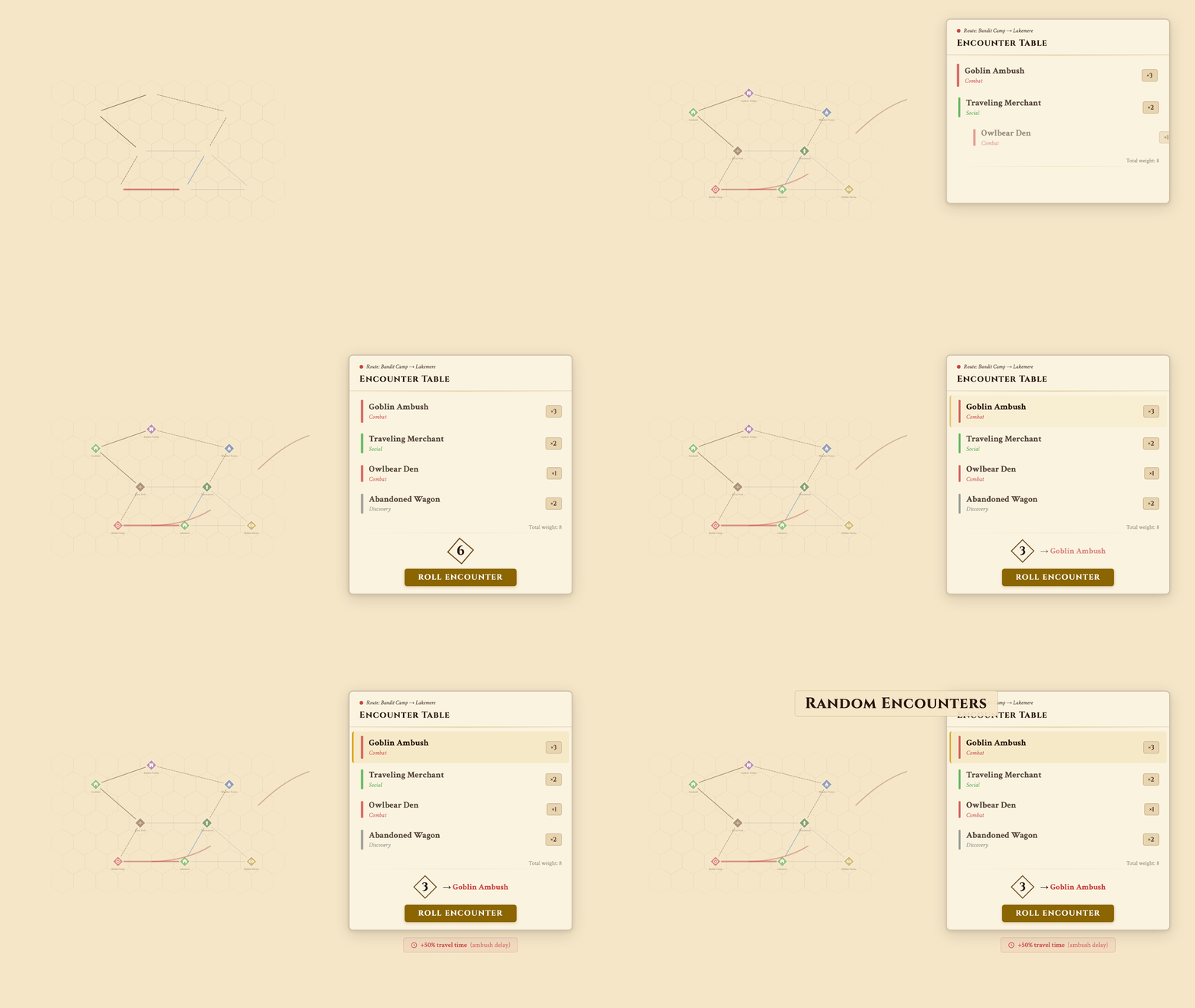
Weighted encounter tables — roll directly in the editor during play.
Attach weighted encounter tables to any route (Pro feature). Each encounter has a probability weight — a goblin ambush might have weight 3, a traveling merchant weight 2, and an owlbear den weight 1. When the party travels the route, roll the table. This replaces the traditional "roll on a random encounter table for this terrain type" — encounters are route-specific and contextual.
This is where the combined system shines. The encounter table lives on the point crawl route, but you can resolve the encounter on the hex map — zoom into the specific hex where it happens, reveal the terrain, and run tactical combat or roleplay with spatial context.
6. Running a Session

Lift the fog, find a path, roll for encounters — the DM session loop.
Here's the practical session flow when using both systems together:
- Start with fog on. Players see only what they've already explored. Turn on the point crawl in the share settings to show known locations; DM-only and secret nodes stay hidden. Share a live link — players open it in their browser.
- Players declare a destination. "We want to travel to the Sunken Tombs." Open the point crawl and use shortest path to find the best route. Tell the party: "The road through River Fork takes 4 watches. The trail through Thornwood is 5 watches but avoids the bandit camp."
- Resolve travel on the point crawl. Roll for encounters along the route. Describe the journey in narrative terms — the hex map provides terrain flavor, but you don't resolve every hex. "You follow the road north through sparse forest. By midday, you reach the River Fork."
- Zoom into the hex map when it matters. An encounter triggers? Switch to hex-level detail. The party wants to explore a side area? Let them navigate hex by hex. Reveal fog as they move. When they return to the road, zoom back out to the point crawl.
- Lift fog as the party travels. Reveal hexes along the route. Next time they travel this road, it's known territory — faster via point crawl.
This "zoom in / zoom out" rhythm is what makes the combined system sing. The point crawl keeps the session moving. The hex map provides depth when you need it.
7. Auto-Generate from Your Hex Map
Building a point crawl by hand is satisfying but slow. Hexer can auto-generate one from your existing hex map in a single click (Pro feature).

One click converts your points of interest into a point crawl network.
What gets converted
- DM notes — each note with a location category becomes a node
- Points of interest — cities, ruins, temples, sacred sites
- Roads and trails — become route edges with appropriate types
- Rivers — become river routes where they connect nodes
- Intersections — where paths cross, crossroad nodes are auto-inserted
- Isolated locations — get fallback overland connections to the nearest node
After generation, edit freely — rename nodes, adjust travel times, add encounter tables, remove routes that don't make sense. The auto-generated network is a starting point, not a final product.
8. Advanced Techniques
Visibility control
Mark nodes and routes as DM-only to hide them from the shared player view. Secret nodes stay hidden until you reveal them, and any node can be hidden until the party finds it; a route shows only when players can see both of its ends. This creates natural exploration incentives — "there's a trail heading east from the crossroads, but you don't know where it leads."
Fog of war + point crawl
Fog of war hides hex terrain. DM-only nodes hide the travel network. Together, they give you layered revelation: players might know a settlement exists (visible node) but can't see the terrain around it (fog). Or they might see terrain along a road but not know about a secret dungeon one hex off the path (DM-only node + fog on the dungeon hex).
Pathfinding for session planning
Use the shortest path tool during prep to estimate journey times between locations. This helps you plan pacing — if the party is 4 watches from the next settlement and you want a combat encounter, place it 2 watches along the route.
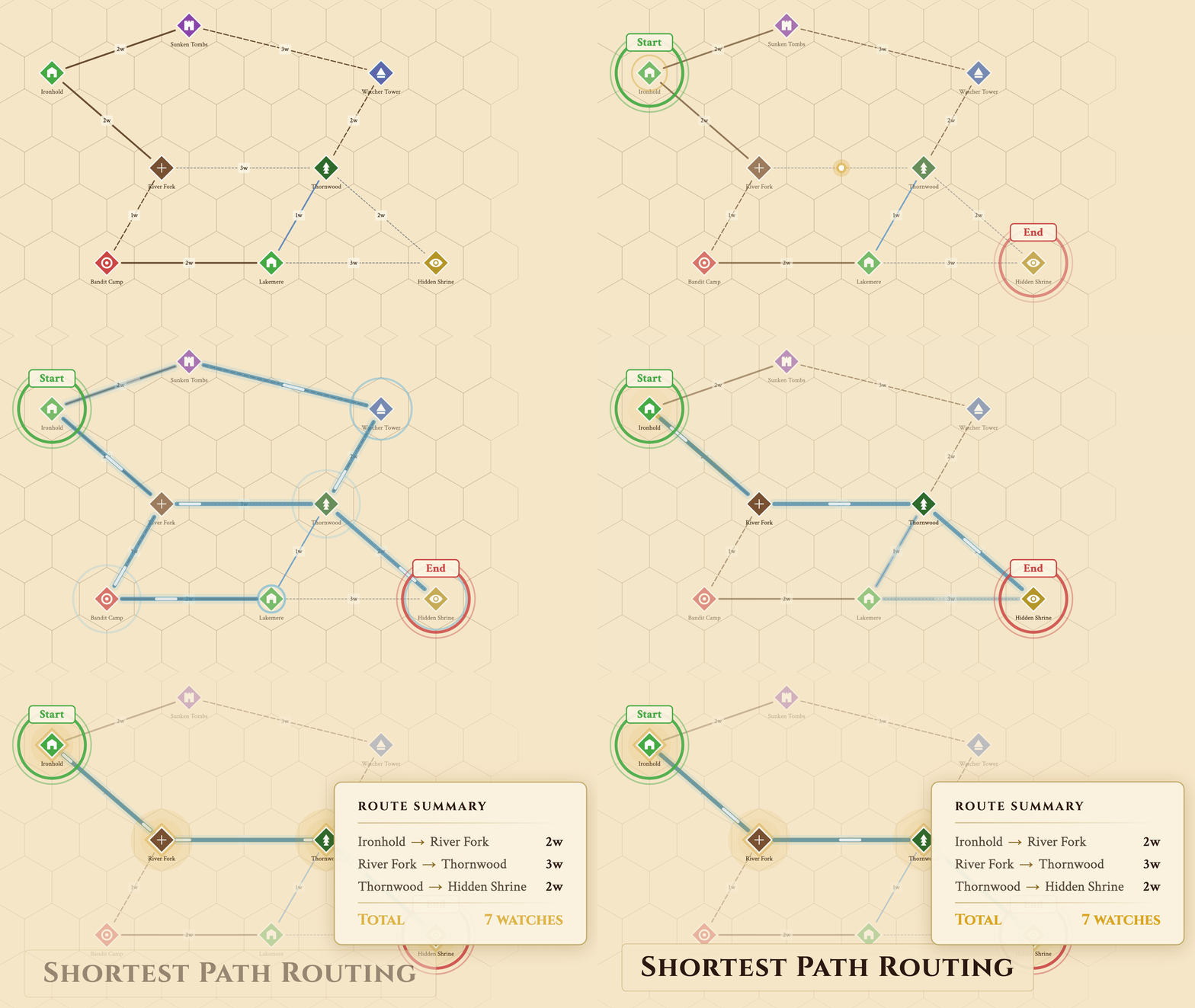
Pick a start and destination — Hexer finds the fastest route.
Locked and impassable routes
Set conditions on routes: a mountain pass might be locked until the party defeats the troll blocking it. A sea route might stay locked until the party hires a ship, and a collapsed tunnel can be marked impassable. The pathfinder excludes impassable and locked routes automatically — players have to solve the problem before the fast-travel option opens up.
Multi-layer integration
If you're using Underdark layers, point crawl nodes can mark cave entrances on the surface that lead to underground locations. The same coordinate grid aligns both layers, so a node at hex (5,3) on the surface connects naturally to whatever you've placed at (5,3) in the Caverns layer.
Further Reading
The ideas in this guide build on decades of tabletop design. Here are the essential references:
- The Alexandrian: Hexcrawl — The definitive hexcrawl procedure for modern play. Watch-based travel, encounter checks, terrain modifiers, hex keys. Required reading.
- The Alexandrian: Pointcrawl — How point crawls work, why they complement hex maps, and how to design good node graphs.
- Hill Cantons: Pointcrawl Series — Chris Kutalik coined the term "pointcrawl." This blog series explores the concept from its origin, with practical design examples.
- Sly Flourish: Thinking Two Horizons Out — Practical prep advice: only detail what the party can see. Works perfectly with the "hex detail near, point crawl far" approach.
- The Angry GM: Getting There Is Half the Fun — A deep dive into making travel meaningful in D&D, covering tension, pacing, and encounter design.
- Judges Guild: Wilderlands of High Fantasy (1977) — The original hex-keyed wilderness campaign. Historical context for every hex map tool that exists today.
Build Your Combined Map
Hexer is the only hex map editor that combines hexcrawl and point crawl on the same map. Basic point crawl is free — no account required.
Frequently Asked Questions
What is the difference between a hexcrawl and a point crawl?
A hexcrawl maps the world at the individual hex level — every hex has terrain, and the party moves from hex to hex. A point crawl maps only the meaningful locations (settlements, dungeons, crossroads) and the routes between them. In a hexcrawl, the map IS the world. In a point crawl, the map is a network of decisions. Hexer layers both on the same map so you can use each where it shines.
Do I need to choose one system or the other?
No — that's the whole point of combining them. Use the hex map for world-building and close exploration. Use the point crawl for structured travel between known locations. Most sessions will blend both: point crawl to cover long distances, hex crawl when the party goes off the beaten path.
Can I auto-generate a point crawl from my hex map?
Yes. Hexer can convert your map notes, points of interest (cities, ruins, temples), roads, trails, and rivers into a connected point crawl graph in one click. Intersections become crossroad nodes automatically. You can edit everything after generation. This is a Pro feature.
How do travel times work in the combined system?
Point crawl routes have travel time measured in 'watches' (~4 hours each). Hexer fills in one watch per hex between the two nodes, and you adjust it for the terrain: a road through plains stays fast, an overland route through mountains takes longer. This gives you concrete session-planning numbers.
Do players see the point crawl in the shared view?
Only if you switch it on in the share settings; it is off by default. Then you control visibility per node and route: mark locations as DM-only to keep them hidden, and secret nodes stay hidden until you reveal them. Combine with fog of war for full exploration control — fog hides the hex terrain, while DM-only nodes hide the travel network.
Is point crawl free in Hexer?
Yes, up to 25 nodes per map: placing nodes, connecting routes, travel time, route difficulty and conditions, and shortest-path routing are all free. Pro removes the node limit and adds encounter tables, one-click generation from your hex map, and nodes that link to other maps.
What external resources should I read about hexcrawls and point crawls?
The Alexandrian's hexcrawl and pointcrawl series are essential reading — they codified both systems for modern tabletop play. Sly Flourish's 'Return of the Lazy Dungeon Master' has practical advice on travel prep. For a historical perspective, look at the Judges Guild's Wilderlands (1977), which pioneered hex-keyed wilderness maps.