
Guide for Game Masters
How to Build a Hexcrawl Map
From blank canvas to adventure-ready wilderness. A practical guide to creating hexcrawl maps for D&D 5e, OSR systems, or any tabletop RPG where exploration matters.
Written for GMs who want to run hex-based exploration — whether you're prepping your first hexcrawl or looking for a better tool.
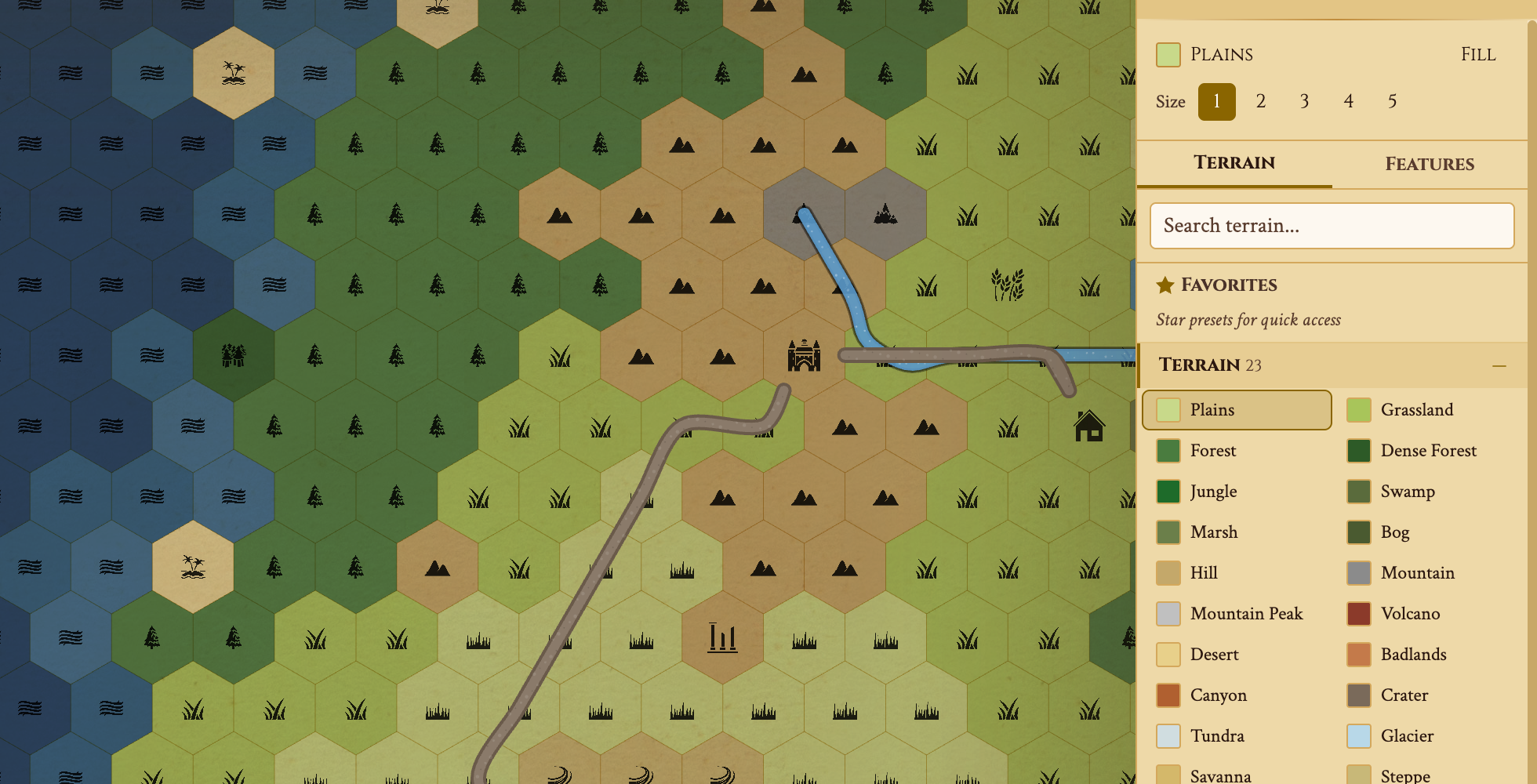
Try painting terrain — pick a type and drag across hexes.


Key Takeaways
- Scale: 6 miles per hex is the standard. A party covers 3-4 hexes per day on foot.
- Size: Start with a 40×30 map (1,200 hexes, ~240×180 miles).
- Density: Key 1 in 3 hexes with encounters, landmarks, or secrets.
- Layers: Add Underdark depths below the surface for vertical exploration.
- Play: Share a live link with fog of war. Reveal hexes as players explore.
Step 1 — Choose Your Scale
Before painting a single hex, decide what each hex represents. The most common standard is 6 miles per hex — inherited from the original D&D outdoor rules. A party on foot covers 3-4 hexes per day. This scale gives enough room for wilderness encounters without making travel feel like a chore. (Some GMs prefer 12-mile hexes, as recommended in The Alexandrian's hexcrawl series, which keeps the visible horizon within the current hex.)
For a campaign-length hexcrawl, start with a 40×30 grid. That's roughly 240×180 miles — enough for a full adventure region with forests, mountains, settlements, and coastline. You can always expand later.
In Hexer, create a new map and set your dimensions. Free tier supports up to 40×30; Pro goes to 200×200 for continent-scale maps.
Hex Scale Reference
Different scales suit different campaigns. Here's how common hex sizes translate to travel and map coverage:
| Hex Size | Hexes/Day (Foot) | 40×30 Map Covers | Best For |
|---|---|---|---|
| 1 mile | 24 hexes | 40×30 miles | Local area, a single valley or forest |
| 6 miles (D&D standard) | 3-4 hexes | 240×180 miles | Regional hexcrawl, the classic format |
| 12 miles | 2 hexes | 480×360 miles | Kingdom-scale, multi-session campaign |
| 24 miles | 1 hex | 960×720 miles | Continental overview, Greyhawk-style |
The 6-mile hex is the most popular for a reason: it's one day's meaningful decision. Players choose a direction each morning, and you resolve 3-4 hexes of travel before camp. Each hex feels like a distinct location without bogging down in micro-movement.
You don't have to pick just one. With scale levels, a 24-mile continent can hold a 6-mile regional map and a 1-mile local map, each its own hex grid, with your rivers, roads, and notes carried between them. One level below the base map is free.
Step 2 — Lay Down Geography
Start with the big shapes. Place a mountain range to split the map, a river flowing from highlands to coast, a forest that blankets the northwest. This gives your wilderness a believable skeleton before you fill in details.
Two approaches work well:
Generate, then edit
Use Hexer's procedural generator to create a realistic base — mountain ranges, rivers, roads, kingdoms, and named settlements, each with a DM note — then hand-paint adjustments. Best when you want a living region fast.
Paint from scratch
Drag terrain by hand using the brush tool. 79 free hex types (41 terrain + 38 features) give you everything from enchanted forests to dungeons. Pro unlocks 45 more. Best when you have a specific vision for your world.
Step 3 — Key Your Hexes
This is where your hexcrawl comes alive. "Keying" a hex means attaching content — an encounter, landmark, secret, or event that triggers when the party enters or explores that hex. When I built my first hexcrawl, I made the mistake of trying to key every hex before session one — it took 20 hours and my players only explored 15 hexes. Start lean.
A good density is one keyed hex for every three. On a 40×30 map (1,200 hexes), that's about 400 keyed hexes. Sounds like a lot, but most entries are just a sentence or two:
- Encounter: "Goblin war camp. 2d6 goblins + 1 hobgoblin captain."
- Landmark: "Ruined watchtower. Climbable — grants vision to adjacent hexes."
- Secret: "Hidden cave entrance behind waterfall. Leads to Underdark."
- Settlement: "Thornwick village. Blacksmith, inn, rumor board."
In Hexer, use DM notes to attach rich-text content to any hex. Categorize each note (Encounter, Secret, Landmark, etc.) and mark secrets as DM-only so players never see them in the shared view.
Encounter Density Guide
How much content should you prep per hex? It depends on the feel you want. Here's a density guide for a 1,200-hex map (40×30):
| Density | Keyed Hexes | Prep Time | Feel |
|---|---|---|---|
| Sparse (1 in 6) | ~200 hexes | 6-8 hours | Vast wilderness, lonely roads, survival-focused |
| Standard (1 in 3) | ~400 hexes | 12-16 hours | Classic hexcrawl: something around every corner |
| Dense (1 in 2) | ~600 hexes | 20-30 hours | Packed region: a frontier, warzone, or magical forest |
| Maximum (every hex) | 1,200 hexes | 60+ hours | Published module quality: every hex has unique content |
Start with standard density and fill in more as your players explore. Sly Flourish's "think two horizons out" approach works well here: prep the party's current hex plus what's visible 2-3 hexes out. Key the starting area thoroughly and fill in more as they move. Hexer's note system lets you add content to any hex at any time.
Tip: Use a mix of note categories. For every 10 keyed hexes, aim for roughly 3 Encounters, 2 Landmarks, 2 Secrets, 2 Settlements, and 1 Quest Hook. This keeps exploration varied and rewards different play styles.
Ready to key your own hexes?
You don't have to finish reading first — open a blank map, paint terrain, and drop your first encounter note. It's free, no account needed.
Build Your Hexcrawl FreeStep 4 — Add Paths & Regions
Roads, trails, and rivers make travel meaningful. In a hexcrawl, staying on a road means faster movement and fewer random encounters. Going off-trail is slower and riskier — but that's where the treasure is.
Draw paths to connect your settlements and define overland routes. Use regions to mark territories — the Elven Forest, the Blighted Wastes, the Iron Marches. Regions give players a sense of place and let you vary encounter tables by area.
Hexer's travel route tool lets you plan multi-hex journeys with terrain-aware pace calculations, so you can tell your players exactly how long it takes to travel from Thornwick to the Dragon's Teeth mountains.
Step 5 — Run the Hexcrawl
Your map is ready. Here's the session flow:
- Share a live link — players open it in their browser. No app install needed.
- Start with fog on — the map is hidden. Only revealed hexes are visible to players. (Pro feature)
- Each "day" in-game, players choose a direction. Move the party marker, reveal the hex, read your key.
- Check for encounters — roll on your random table, or trigger the keyed content for that hex.
- Track resources — food, water, torches. Hexcrawls shine when the wilderness feels dangerous.
- Let the party keep notes — with player journals, players write what they found on the hex itself. Move rival factions and wandering monsters with map tokens.
After the session, export your map as a Hex Key document for a printable reference, or as a Universal VTT file to bring it into Foundry.
Step 6 — Add Depth with Layers
A hexcrawl doesn't have to stay on the surface. With hex map layers, you can build a multi-level world where the party descends from the overworld into caverns, the Underdark, or anything else beneath the surface.
Hexer is the only hex map editor with multi-layer support. Each map has a Surface layer plus 3 Underdark depths:
- Surface — your main overworld map with forests, mountains, and settlements.
- Caverns — shallow caves, mines, and tunnels just below the surface.
- Deep Caverns — deeper caverns, underground rivers, and drow outposts.
- The Underdark — the deepest reaches: aboleths, mind flayers, alien ecosystems.
Switch between layers with the depth selector. Each layer has its own terrain, paths, regions, and notes — but they share the same coordinate grid, so a cave entrance at hex (5,3) on the surface lines up with the cavern at (5,3) in the Caverns layer.
This is what makes a layered hex map powerful for hexcrawls: players find a staircase in a dungeon, and you switch to the Caverns layer to reveal what's below. The fog of war works independently per layer, so the surface can be explored while the depths remain hidden.
Layers are a Game Master (Pro) feature. Read more about Underdark mapping in Hexer.
Start Building Your Hexcrawl
Hexer gives you everything you need — terrain, generation, notes, paths, sharing, and export. Free to start, no account required.
Frequently Asked Questions
What is a hexcrawl?
A hexcrawl is a style of tabletop RPG play where the party explores a hex-gridded wilderness map. Each hex contains terrain, encounters, or points of interest that the DM reveals as players travel. It emphasizes exploration, resource management, and player-driven adventure over a linear narrative.
How big should a hexcrawl map be?
A 40x30 hex map is a solid starting size — large enough for several sessions of exploration, small enough to prep in an evening. Each hex typically represents 6 miles (the D&D standard), so a 40x30 map covers roughly 240x180 miles of wilderness.
How many hexes should have content?
A good rule of thumb: key every third hex with something notable — an encounter, landmark, or secret. The rest can be travel terrain. This gives density without overwhelming your prep. Hexer's note system lets you key hexes with categories like Encounter, Secret, and Landmark.
Can I run a hexcrawl with Hexer's free tier?
Yes. The free tier gives you all 41 terrain types, 38 map features (settlements, dungeons, sacred sites), procedural generation, all export formats, paths, regions, DM notes, and live sharing. You get one saved map up to 40×30 hexes. Upgrade to Pro for 45 premium features, Underdark terrain, fog of war, Underdark layers, maps up to 200×200, and unlimited maps.
What is the best free hex map maker for a hexcrawl?
Hexer is a free, browser-based hex map maker built specifically for hexcrawls — no download and no signup required to start. The free tier includes 41 terrain types, 38 map features, procedural world generation, DM notes, paths, regions, live player sharing, and every export format (PNG, SVG, Universal VTT for Foundry and Roll20, and printable hex keys). Alternatives like Hextml, Worldographer, and Inkarnate each trade off in maintenance, price, or hex-first design; Hexer is actively developed and hex-first. You can compare them directly on the Hexer comparison pages.
What hex scale should I use for a hexcrawl?
The D&D standard is 6 miles per hex. A party on foot covers 3-4 hexes per day at this scale. For local adventures, use 1-mile hexes. For kingdom-scale campaigns, use 12-mile hexes. For continental maps, use 24-mile hexes. The 6-mile hex is the most popular because each hex represents one meaningful travel decision.
Can I create a multi-layer hex map with surface and underground?
Yes. Hexer is the only hex map editor with multi-layer support. Each map has a Surface layer plus 3 Underdark depths: Caverns, Deep Caverns, and The Underdark. Each layer has independent terrain, paths, notes, and fog of war, but shares the same coordinate grid so cave entrances align between layers. Layers are a Pro feature.
Does Hexer support hex keys for old-school play?
Yes. Export your map as a Hex Key document — a structured Markdown file keyed by hex, listing every note, labeled location, and token, plus your point crawl routes. Perfect for printing and running sessions without a screen.