
Rich text on every hex
DM Notes & Hex Keying
Attach encounters, secrets, landmarks, and lore to any hex on your map. Keep DM-only notes hidden from players. Export the whole thing as a printable hex key.
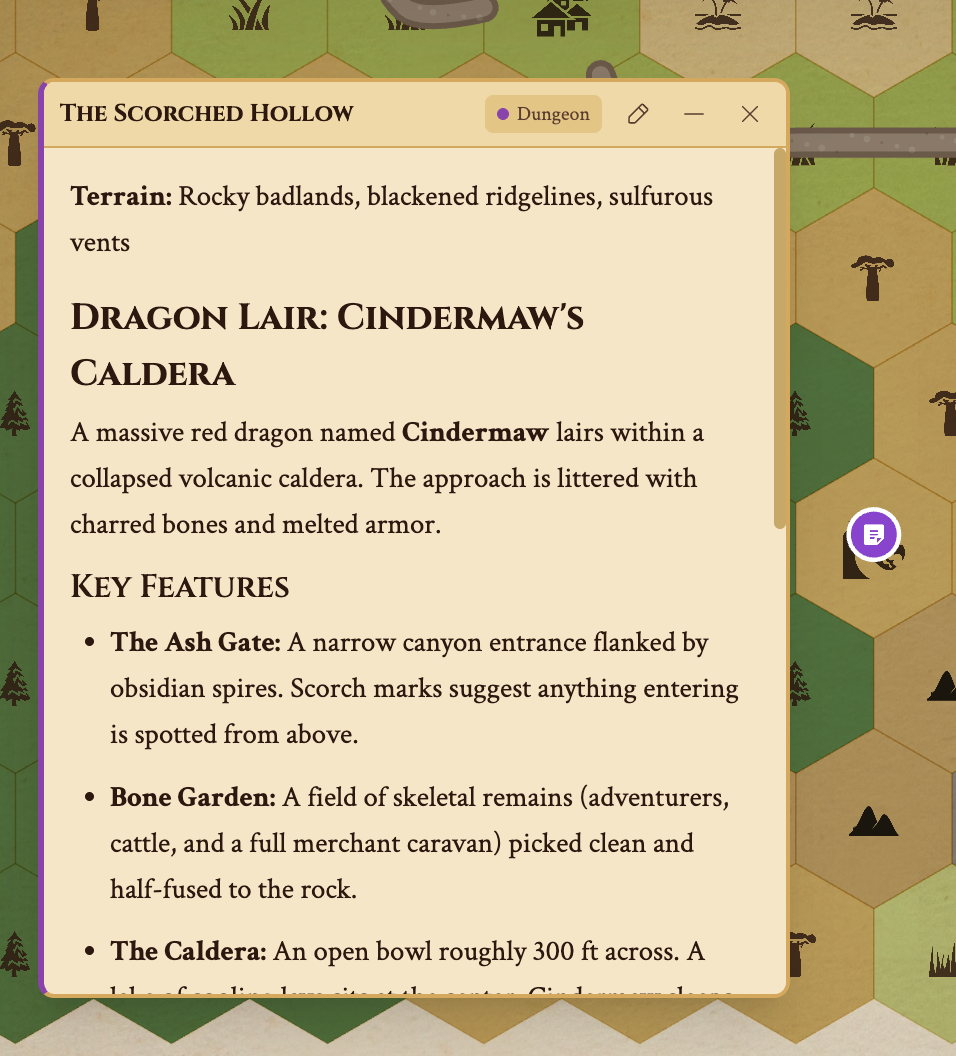
Click the red note badge to open a hex note.


How Notes Work
Rich text editor
Each note opens a full-featured text editor with bold, italic, lists, headings, and links. Paste markdown and it converts automatically. No character limit — write as much or as little as you need.
Categories for organization
Tag notes as Landmark, Encounter, Settlement, Dungeon, Secret, Hazard, Resource and Custom. Filter by category when prepping sessions or reviewing the map. Each category gets a distinct color badge on the map.
DM-only secrets
Mark any note as DM-only. When you share a live link with your players, they see the map with fog and terrain — but DM-only notes stay completely hidden. Reveal them when the moment is right by toggling the visibility flag.
Who sees what, and when
Choose per note: Always Visible, DM Only, Discovered by Fog, Line of Sight Only. A note discovered by fog appears once the party lifts the fog over its hex; a line-of-sight note shows only while they can see it. Combined with fog of war, this gives you full control over pacing and discovery.
Your players write back
With player journals, the party keeps its own notes on the hexes it explores, right in the shared view. When a player writes something worth keeping, promote the entry into one of your DM notes.
Built for hexcrawl keying.
The classic hexcrawl workflow: paint your wilderness map, then "key" each interesting hex with encounters, landmarks, and secrets. Hexer's note system is designed exactly for this — place a note, pick a category, write your key.
Or start keyed: a generated world comes with a DM-only note on every settlement and site, ready to rewrite in your own words.
When you're done, export as a Hex Key — a structured Markdown document with every keyed hex listed by coordinates and terrain. Print it, bring it to the table, and run your hexcrawl with a physical reference sheet. Read our hexcrawl guide for the full workflow.
Notes work on every layer. Key surface encounters separately from Underdark encounters. Each layer's notes are independent — no cross-contamination.
Start Keying Your Map
Notes are free on every tier. Open the editor, click any hex, and start writing.
Frequently Asked Questions
Are DM notes free?
Yes. DM notes are available on the free tier. Attach notes to any hex with rich text, categories, and a choice of who sees them — no account required.
Can players see my DM notes?
Only if you want them to. Each note is Always Visible, DM Only, Discovered by Fog (shown once the fog over its hex lifts), or Line of Sight Only (shown only while the party can see the hex).
What note categories are available?
Landmark, Encounter, Settlement, Dungeon, Secret, Hazard, Resource and Custom. Categories help you filter and organize notes when prepping sessions.
Can I export my hex key with notes?
Yes. The Hex Key export generates a structured Markdown document listing every keyed hex with its terrain, coordinates, and note content. Perfect for printing and running sessions without a screen.
Do notes work on Underdark layers?
Yes. Each layer has its own notes. Place notes on surface hexes and underground hexes independently. Notes appear in the shared view when a player is on that layer.